Transactions
Per-sheet walkthrough — L1 Reconciliation Dashboard.
What the sheet shows
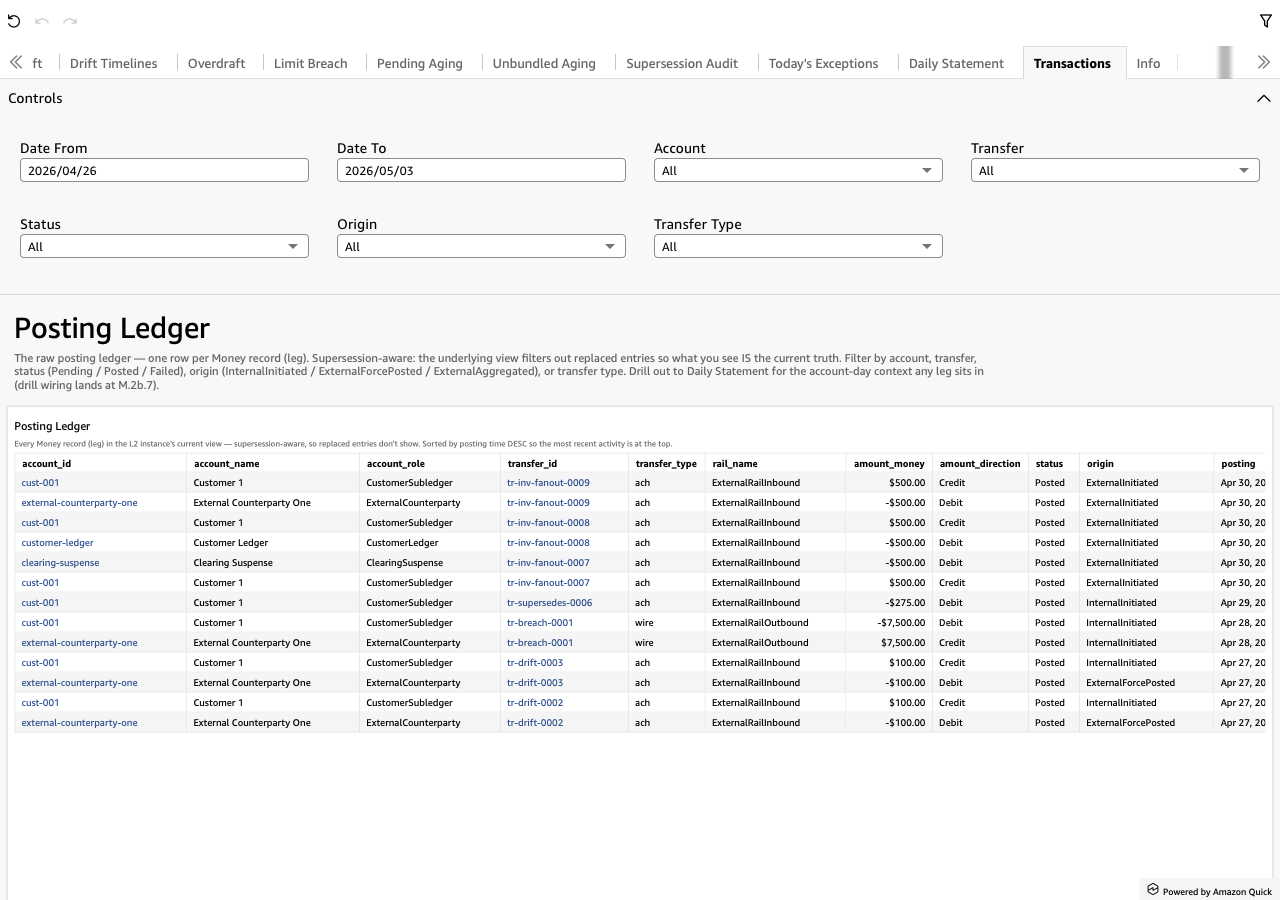
The raw posting ledger — one row per Money record (leg).
Supersession-aware via the l2_current_transactions
matview: it projects only the highest-entry version per logical key,
so what the analyst sees IS the current truth (superseded entries
never reach the view).
Sorted by posting DESC so the most recent activity sits at the
top. The sheet's value is "show me every leg, then filter to the
slice I care about" — no KPIs above the table, just dropdowns.
Screenshot
When to use it
Drill-down endpoint. You land here three ways:
- drilled from Daily Statement (right-click a leg), narrowed by
transfer_idso the analyst sees every leg of one transfer - drilled from Pending Aging, Unbundled Aging or
Supersession Audit — same
transfer_idnarrowing via thepL1TxTransferIdparameter - browsed manually with the dropdown filters
Visuals
- Posting Ledger (Table) — every leg from the
l2_current_transactionsmatview. Columns:transaction_id— the logical-transaction key, leading column (the Transaction ID search narrows it)account_id,account_name,account_display,account_role— who got postedtransfer_id,rail_name— what kind of transferamount_money,amount_direction— the signed amount + Debit / Credit labelstatus— Pending / Posted / Failedorigin— InternalInitiated / ExternalForcePosted / ExternalAggregatedbusiness_day,posting— timestamps (business_dayis the day-grain truncation ofposting, so the auditor can read which day the leg posted to)
On the self-hosted renderer each row also carries a per-row metadata
JSON popup — carried on the payload, not rendered as a column header.
Internal storage columns stay in the matview but aren't surfaced here
(entry, account_scope, account_parent_role, template_name,
bundle_id, supersedes, metadata, transfer_parent_id,
transfer_completion).
Drills
- Right-click an
account_idcell → "View Daily Statement for this account-day" → opens Daily Statement for that leg's (account, business-day). The drill writesbusiness_day(the day-grain truncation ofposting) so the destination's balance-date filter aligns with the daily-balancesbusiness_day_start.
transfer_id is NOT drillable — its natural target would be this same
Transactions sheet (self-drill), so it's stripped.
When drilled IN from Daily Statement (or the aging / audit sheets),
the pL1TxTransferId parameter narrows the table to one
transfer_id; clearing the parameter (re-opening the sheet from the
tab bar) restores the full ledger.
Filters
- Account — multi-select dropdown over
account_id. - Transfer — multi-select dropdown over
transfer_id. Useful when chasing a multi-leg transfer's full set. - Transaction ID — typeahead over the logical
transaction_id. A different axis from Transfer:transaction_idkeys one transaction,transfer_idgroups the legs of a transfer event. - Status — Pending / Posted / Failed.
- Origin — InternalInitiated / ExternalForcePosted / ExternalAggregated.
- Transfer Type — narrow by
rail_name(ach / wire / fee / internal / etc).
No date-range pickers — the supersession-aware ledger is small enough by L1 invariants that range filtering buys little. To scope by date, use Daily Statement (single-day) or filter manually via the table sort + scroll.