Limit Breach
Per-sheet walkthrough — L1 Reconciliation Dashboard.
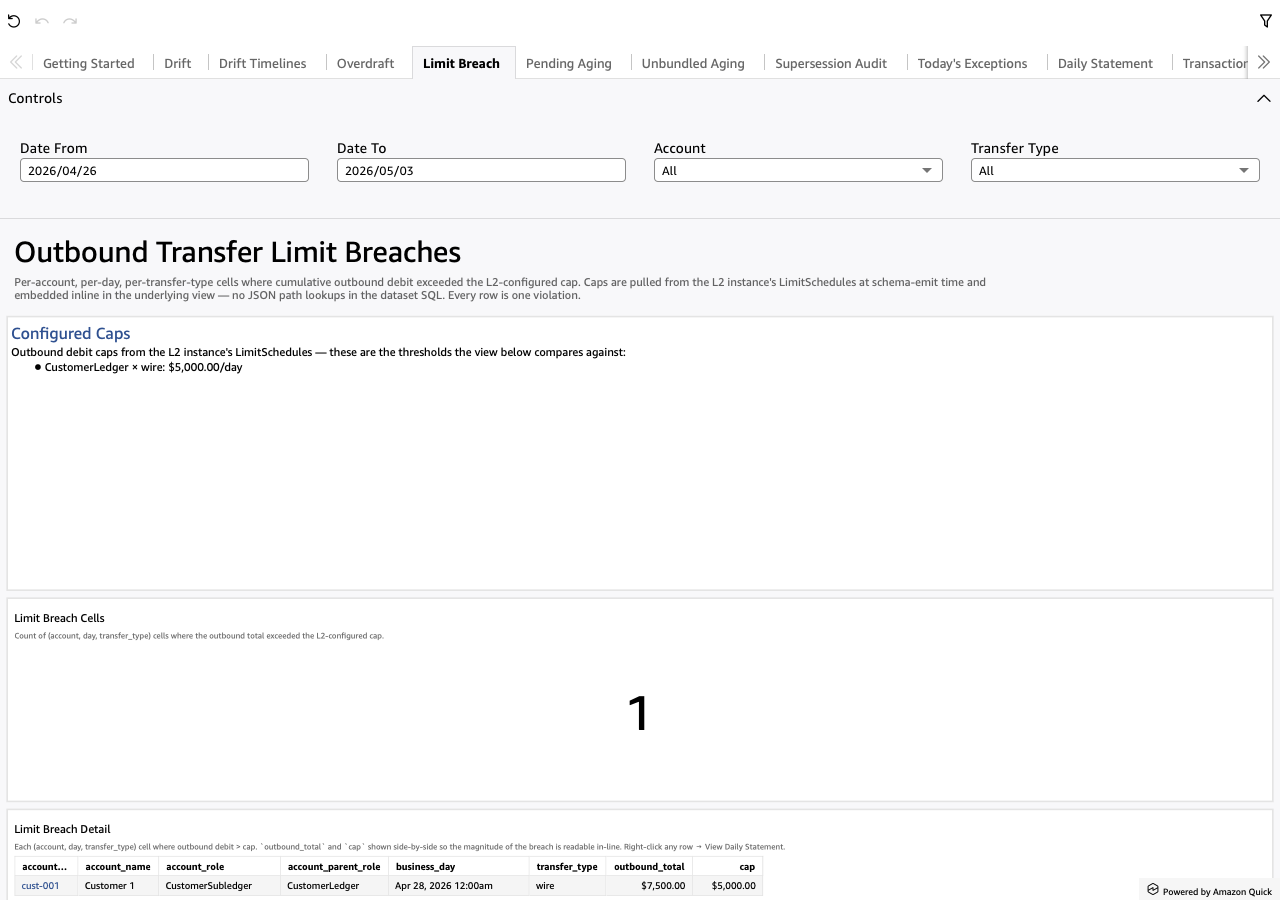
What the sheet shows
One row per cell — one (account, day, rail_name, direction) — where the
flow on the breaching side ran past the L2-configured cap. direction
splits the two checks the same view runs: Outbound is the classic per-rail
send cap (debit flow over the cap); Inbound is an AML / structuring
threshold on inbound volume (credit flow over the cap).
Caps come from the L2 instance's LimitSchedules. The limit-breach matview
JOINs a typed config view (<prefix>_v_config_limit_schedules, a
relational walk of the L2 yaml) keyed on (parent_role, rail, direction)
— nothing baked into the SQL, so a cap change is an L2 edit plus a matview
refresh, not a re-emit.
outbound_total and cap sit side-by-side so the magnitude of the breach
reads in-line. (The column keeps the outbound_total name even on an
Inbound row, where it holds the inbound credit total — totals on the
breaching side.)
Screenshot
When to use it
Daily. Common driver: one large outbound (an unusual wire) that shoved an account past its cap. Less common but more concerning: a slow accumulation of small outbounds that drifted across the threshold.
Visuals
- Configured Caps (TextBox) — one bullet per L2 LimitSchedule,
rendered
parent_role × rail: $cap/dayplus the L2-supplied prose. Shows the analyst what's configured BEFORE what got breached. (No schedules on the L2 ⇒ one bullet saying so; the view returns zero rows by construction.) - Breaches in Window (KPI) — count of
(account, day, rail_name,
  direction)
cells over the visible date range. Zero = no rule violations in the window (the unambiguous healthy state). A stalelimit_breachmatview also reads zero — the App Info sheet's matview-status table shows the lag. - Limit Breach Detail (Table) — one row per breach. Carries
account_id,account_name,account_display,account_role,account_parent_role,business_day,rail_name,direction,outbound_totalandcap.
Drills
- Right-click any row → "View Daily Statement for this account-day" — opens Daily Statement on every leg that fed the breach.
Filters
- Date From / Date To — universal date-range pickers.
- Account — single-select dropdown over
account_display. - Transfer Type — single-select dropdown over the rail names.